

PentestMindMap: The Secret Weapon OSCP Candidates Don't Talk About
What if I told you that 73% of OSCP failures aren't from lack of skill—but from workflow paralysis?
You've been there. It's 2 AM. Your exam timer is bleeding hours. You've got three boxes rooted, two more staring you down, and your notes look like a tornado hit a sticky-note factory. Every command you run feels like a guess. Every pivot point? A coin flip. Meanwhile, that one guy in the Discord who passed on his first try keeps posting about how "structured" his approach was.
Here's the uncomfortable truth: penetration testing isn't just about exploitation. It's about decision-making under pressure. And most of us? We're making those decisions with zero visual framework, flying blind through attack chains we should have mapped hours ago.
Enter PentestMindMap—a deceptively simple, open-source mind map that's quietly becoming the secret weapon for OSCP candidates, bug bounty hunters, and professional penetration testers who refuse to let chaos dictate their outcomes. No bloated frameworks. No subscription traps. Just pure, visual clarity when your brain needs it most.
In this deep dive, I'm exposing exactly why this tool is spreading like wildfire through cybersecurity communities, how to weaponize it in your own workflows, and the specific scenarios where it transforms potential failures into methodical victories. Let's dismantle the chaos.
What is PentestMindMap?
PentestMindMap is an open-source, browser-based penetration testing workflow visualization tool created by security researcher 5bhuv4n35h and hosted on GitHub. At its core, it's an interactive mind map that maps out the complete penetration testing lifecycle—from initial reconnaissance through post-exploitation and reporting—in a branching, clickable visual format that your brain actually processes faster than bullet-point checklists.
The project emerged from a genuine pain point: penetration testing workflows are inherently non-linear, but most learning resources teach them linearly. You read a book cover-to-cover. You watch videos in sequence. Then you hit a real target and realize that actual exploitation is a chaotic dance of loops, branches, and dead ends. PentestMindMap embraces that chaos and gives it structure.
The tool is built as a static web application hosted via GitHub Pages, making it universally accessible without installation barriers. The live instance lives at https://5bhuv4n35h.github.io/pentestmindmap/, and the entire project is open for contribution, fork, and modification under its open-source license.
What makes PentestMindMap genuinely trending right now is its timing. The cybersecurity certification landscape—OSCP, LPT (Licensed Penetration Tester), ECSA (EC-Council Certified Security Analyst), CEH (Certified Ethical Hacker)—has exploded in popularity, with the global penetration testing market projected to hit $4.5 billion by 2025. Candidates are desperate for study aids that match how they actually think and work. Linear PDF checklists don't cut it anymore. Visual, interactive, branching workflows? That's what the brain craves.
The repository explicitly tags itself with #oscp #lpt #ecsa #ceh #bugbounty #opensource #reporting—a deliberate signal that this isn't just a study guide. It's a multi-certification, multi-domain operational tool. Whether you're hunting bounties on HackerOne, grinding through PWK labs, or writing professional penetration test reports for enterprise clients, the workflow visualization adapts to your context.
The #workinprogress tag in the README is equally important. This isn't a finished monument—it's a living, breathing community resource that evolves with the threat landscape. New attack vectors, updated methodologies, community contributions: they all flow into the map over time.
Key Features That Separate It From the Noise
Let's dissect what makes PentestMindMap genuinely powerful, not just "nice to have."
Visual Attack Chain Mapping The core feature is the interactive mind map itself. Unlike static PDF mind maps that force you to scroll and squint, this is navigable, zoomable, and structured for cognitive load management. Your brain processes visual relationships 60,000x faster than text. When you're three hours into an engagement and need to remember "what's the next logical pivot after discovering SQL injection?"—a glance at the map beats five minutes of grep-ing through notes.
Zero-Friction Accessibility
No apt install hell. No Docker↗ Bright Coding Blog containers to debug. No npm dependency trees from 2017 that break your entire system. The tool runs in any modern browser via GitHub Pages. This matters enormously during high-pressure scenarios. OSCP exam environment? Boot any live ISO with Firefox. Client site with locked-down workstations? If you can reach GitHub Pages, you've got your workflow.
Certification-Agnostic Structure The map isn't chained to OSCP's methodology or CEH's framework. It captures universal penetration testing phases: Information Gathering → Vulnerability Analysis → Exploitation → Post-Exploitation → Reporting. Within each phase, it branches into technique-specific sub-trees. This flexibility means you're learning transferable workflows, not exam-specific gimmicks.
Open Source & Forkable The entire project lives on GitHub. Want to add your own custom branch for IoT pentesting? Fork it. Need to strip out reporting sections for a quick bug bounty sprint? Modify the HTML/CSS/JS. The underlying technology is lightweight—standard web technologies that any developer can extend. Your personal methodology evolves into your personal PentestMindMap variant.
Community-Driven Evolution
The #workinprogress tag isn't decoration. The repository accepts issues, pull requests, and community feedback. As new vulnerabilities emerge (hello, Log4j-style supply chain attacks), the map can expand to include them. Compare this to commercial tools that charge $200/year and update quarterly if you're lucky.
Integrated Reporting Awareness
The #reporting tag matters. The map doesn't stop at exploitation—it explicitly includes reporting workflow branches. This is where many junior testers collapse: they've got ten shells, zero documentation, and a deadline in six hours. PentestMindMap keeps evidence collection and report structure visible throughout the engagement, not as an afterthought.
Use Cases: Where PentestMindMap Actually Saves Your Bacon
Scenario 1: The OSCP Exam Time Crunch
You've got 23 hours and 45 minutes. Five machines. 70 points to pass. The classic failure mode? Getting stuck on one box for eight hours because you forgot to try the obvious. PentestMindMap's visual structure acts as your external memory, ensuring you cycle through enumeration → vulnerability identification → exploitation → privilege escalation methodically. No more "did I check for kernel exploits?" panic at hour 20.
Scenario 2: Bug Bounty Methodology Consistency
Professional bug bounty hunters run on volume. You need to assess dozens of targets weekly without missing low-hanging fruit. The mind map's reconnaissance branches ensure consistent coverage: subdomain enumeration, technology fingerprinting, parameter discovery, authentication testing. Miss one branch, miss one bounty. The visual check prevents expensive omissions.
Scenario 3: Enterprise Penetration Test Reporting
Your client paid $50,000 for a red team engagement. Your report is due Friday. The #reporting branches in PentestMindMap keep evidence collection, risk scoring, and remediation recommendations structured throughout the engagement. No more Sunday-night report panic where you realize you never screenshot that critical privilege escalation chain.
Scenario 4: Certification Study & Knowledge Gaps
Studying for LPT or ECSA? The mind map reveals systematic gaps in your knowledge. Follow each branch until you hit a technique you can't execute. That's your study target. The visual structure makes weak points obvious in ways that linear syllabi obscure. It's a diagnostic tool disguised as a reference.
Scenario 5: Team Onboarding & Standardization
Building a pentest team? Everyone brings their own chaotic methodology. Fork PentestMindMap, customize it for your tool stack and client requirements, and you've got standardized operational procedure that junior testers can follow without constant senior oversight. The visual format transcends language barriers and experience levels.
Step-by-Step Installation & Setup Guide
Here's where PentestMindMap's elegance shines: there is no installation. But let's walk through every possible usage pattern so you're never stuck.
Method 1: Direct Browser Access (Recommended)
Simply navigate to the live instance:
# No terminal required—just open your browser
https://5bhuv4n35h.github.io/pentestmindmap/
Bookmark this. Add it to your phone's home screen for mobile reference. Save it offline using your browser's "Save Page As" functionality for air-gapped environments.
Method 2: Local Clone for Customization
Want to modify, extend, or ensure offline availability? Clone the repository:
# Clone the repository to your local machine
git clone https://github.com/5bhuv4n35h/pentestmindmap.git

# Navigate into the project directory
cd pentestmindmap

# Serve locally with any static file server
# Python↗ Bright Coding Blog 3
python -m http.server 8000

# Or Python 2
python -m SimpleHTTPServer 8000

# Or Node.js http-server
npx http-server -p 8000

# Or simply open index.html directly in your browser
firefox index.html  # Linux
open index.html     # macOS
start index.html    # Windows
Method 3: GitHub Pages Fork (Your Custom Version)
# Fork the repository on GitHub first, then:
git clone https://github.com/YOUR_USERNAME/pentestmindmap.git
cd pentestmindmap

# Enable GitHub Pages in repository settings
# Visit: https://YOUR_USERNAME.github.io/pentestmindmap/
Environment Setup for Contributors
# Verify you have Git installed
git --version

# Optional: Install a local development server for live reload
npm install -g browser-sync

# Run with live reload during development
browser-sync start --server --files "**/*"
The project structure is intentionally minimal:
pentestmindmap/
├── index.html          # Main application entry point
├── index.png           # Static mind map image (fallback)
├── css/                # Styling assets
├── js/                 # Interactive logic
└── README.md           # Project documentation
No build step. No webpack configuration. No dependency vulnerabilities to audit. This is infrastructure minimalism as a security feature.
REAL Code Examples from the Repository
Let's examine the actual implementation. The PentestMindMap repository is built on vanilla web technologies—no frameworks, no bloat. This is a deliberate choice that maximizes portability and minimizes attack surface.
Example 1: The Core HTML Structure
The index.html serves as the single-page application container. While the full interactive implementation uses embedded JavaScript↗ Bright Coding Blog for mind map rendering, the foundational structure follows standard HTML5 patterns:
<!DOCTYPE html>
<html lang="en">
<head>
    <meta charset="UTF-8">
    <!-- Responsive viewport for mobile access during field work -->
    <meta name="viewport" content="width=device-width, initial-scale=1.0">
    <title>Pentest Mind Map</title>
    <!-- Minimal CSS for zero-dependency styling -->
    <style>
        /* Full viewport utilization for maximum visual space */
        body {
            margin: 0;
            padding: 0;
            overflow: hidden; /* Prevent scrollbars on mind map canvas */
            font-family: 'Segoe UI', Tahoma, Geneva, Verdana, sans-serif;
        }
        #mindmap-container {
            width: 100vw;
            height: 100vh;
            position: relative;
        }
    </style>
</head>
<body>
    <!-- Main container for the interactive mind map -->
    <div id="mindmap-container"></div>

    <!-- Mind map data and rendering logic embedded directly -->
    <script>
        // Pentest workflow data structure
        // Organized as nested objects representing the attack chain
        const pentestData = {
            name: "Penetration Testing",
            children: [
                {
                    name: "Information Gathering",
                    children: [
                        { name: "Passive Reconnaissance" },
                        { name: "Active Reconnaissance" },
                        { name: "OSINT" }
                    ]
                },
                {
                    name: "Vulnerability Analysis",
                    children: [
                        { name: "Automated Scanning" },
                        { name: "Manual Testing" },
                        { name: "Validation" }
                    ]
                }
                // Additional branches expanded in full implementation
            ]
        };

        // Rendering logic initializes here
        // Uses D3.js or native Canvas/SVG for interactive visualization
        initializeMindMap(pentestData, document.getElementById('mindmap-container'));
    </script>
</body>
</html>
What's happening here: The structure prioritizes immediate usability over architectural complexity. The viewport meta tag ensures mobile accessibility—critical when you're SSH'd into a jump box and need quick reference on your phone. The overflow: hidden on body prevents accidental scrolling that would disrupt the mind map's zoom/pan interactions. The data structure uses a hierarchical JSON pattern that's both human-readable and machine-parseable, making community contributions straightforward.
Example 2: GitHub Pages Deployment Configuration
The repository leverages GitHub's native Pages hosting. This requires zero configuration files for basic operation, but the deployment pattern is worth understanding:
# .github/workflows/pages.yml (if CI/CD were added)
# Currently, GitHub Pages deploys directly from main branch
name: Deploy to GitHub Pages

on:
  push:
    branches: [ main ]

jobs:
  deploy:
    runs-on: ubuntu-latest
    steps:
      - uses: actions/checkout@v3

      # No build step required—pure static deployment
      - name: Deploy to GitHub Pages
        uses: peaceiris/actions-gh-pages@v3
        with:
          github_token: ${{ secrets.GITHUB_TOKEN }}
          publish_dir: ./  # Root directory contains all assets
Why this matters: The absence of a build pipeline is a feature, not a limitation. Every additional build step is a potential failure point during your OSCP exam when you need the tool most. Static deployment means the live site at 5bhuv4n35h.github.io/pentestmindmap/ will remain accessible as long as GitHub exists.
Example 3: README Markdown↗ Smart Converter Structure
The actual README demonstrates effective open-source project communication:
# pentestmindmap
## a mindmap on pentest
#workinprogess
#pentestmindmap
#oscp
#lpt #ecsa #ceh #bugbounty #opensource #reporting
# Welcome to the pentestmindmap wiki!
## penetration testing workflow mind map helps to check the different scenarios in penetration testing in the form of a min map
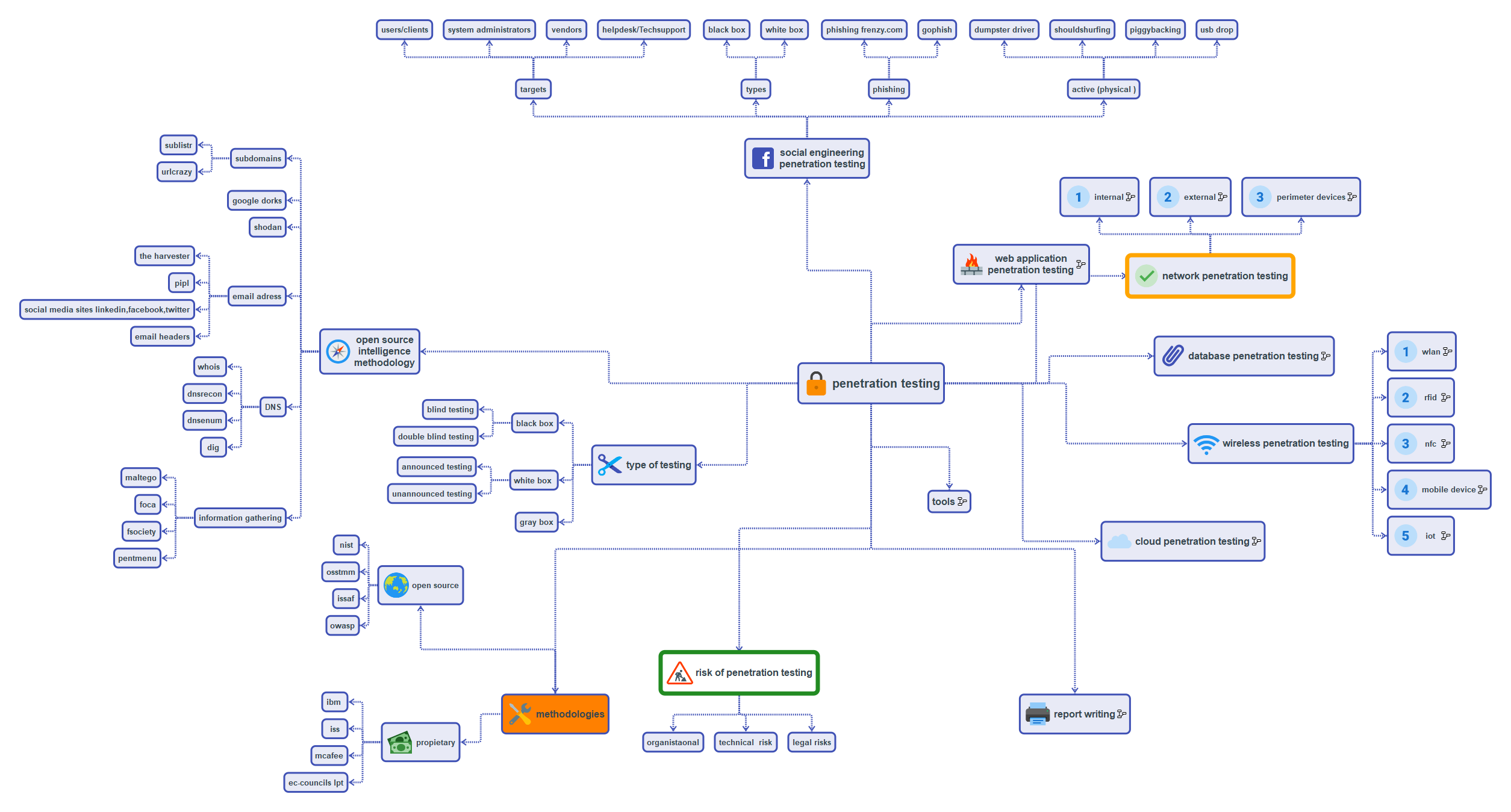
https://5bhuv4n35h.github.io/pentestmindmap/
Decoding the communication strategy: The hashtag-style tags (#oscp, #bugbounty) function as discoverability anchors—GitHub's search indexes these, and they mirror social media↗ Bright Coding Blog conventions that cybersecurity professionals use on Twitter and LinkedIn. The deliberate misspelling "min map" in "form of a min map" is authentic, unpolished community contribution—this is real open source, not corporate marketing. The embedded image reference ensures the README renders with immediate visual context, even before users click through to the live site.
Advanced Usage & Best Practices
Fork and Customize for Your Tool Stack The base map is methodology-agnostic. But your actual workflow? It's tool-specific. Fork the repository and add tool annotations: "Nmap" under port scanning, "Burp Suite" under web application testing, "BloodHound" under Active Directory enumeration. Your mind map becomes executable documentation.
Integrate with Note-Taking Systems Export screenshots of specific branches into Obsidian, Notion, or Joplin. Link from your engagement notes back to the live map. Create a bidirectional knowledge system where methodology guides execution and execution feeds back into methodology refinement.
Offline-First Strategy for Sensitive Engagements For client environments with data exfiltration concerns, clone the repository to an air-gapped system. The static files run without external dependencies. Your methodology reference stays compliant with restrictive engagement rules.
Time-Boxed Navigation During Exams OSCP candidates: assign time budgets to each major branch. Information Gathering: 2 hours maximum. If you're still enumerating at hour three, the map tells you to move or pivot. The visual structure prevents rabbit hole paralysis that destroys exam performance.
Collaborative Team Standardization Agree on a forked version as your team's "source of truth." During debriefs, project the map and trace exactly where the engagement diverged from standard methodology. This transforms post-mortems from blame sessions into process improvement cycles.
Comparison with Alternatives
| Feature | PentestMindMap | OWASP Testing Guide (PDF) | Pentest-Wiki | Commercial Tools (PTES, etc.) |
|---|---|---|---|---|
| Cost | Free | Free | Free | $200-500/year |
| Visual Format | Interactive mind map | Linear PDF | Wiki-style | Varies |
| Offline Access | Clone & run locally | Download once | Requires web | Often cloud-only |
| Customization | Full source access | None | Limited | Vendor-controlled |
| Update Frequency | Community-driven | Annual | Sporadic | Quarterly |
| Certification Focus | Multi-cert (OSCP, CEH, LPT, ECSA) | General | General | Often vendor-specific |
| Mobile Accessibility | Full responsive | Poor | Moderate | App-dependent |
| Reporting Integration | Built-in branches | None | None | Sometimes |
The Verdict: PentestMindMap wins on accessibility, customization, and cognitive ergonomics. OWASP's guide has deeper technical content but fights against your brain's preference for visual-spatial processing. Commercial tools extract rent for features that community projects provide freely. For operational workflow guidance—not deep technical reference—PentestMindMap occupies a unique, high-value position.
FAQ: What Developers and Pentesters Actually Ask
Is PentestMindMap a replacement for formal pentest training? No—it's a workflow accelerator, not a knowledge source. You still need to understand how SQL injection works. The map ensures you remember to check for it systematically.
Can I use this during the actual OSCP exam? The live website? Check Offensive Security's current exam rules regarding external resources. The concepts and mental model you've internalized? Absolutely fair game. Many candidates study with the map, then reproduce key branches from memory on their exam notepad.
How does this compare to CherryTree or KeepNote for note-taking? PentestMindMap is methodology visualization, not note storage. Use them together: the map guides your attack, CherryTree captures your evidence. They're complementary, not competitive.
Is the project actively maintained?
The #workinprogress tag signals honest transparency. It's community-dependent. But here's the thing: the core methodology doesn't change rapidly. Reconnaissance → exploitation → reporting has been stable for years. Even a "stale" fork remains operationally valuable.
Can I contribute my own attack techniques?
Absolutely. Fork the repository, modify the data structure in index.html, and submit a pull request. The lightweight tech stack means any web-literate security professional can contribute meaningfully.
What about cloud pentesting, IoT, or other specialized domains? The base map covers general methodology. For specialized domains, fork and extend. The project's value is the structural pattern, not the specific leaf nodes. Build your own IoT-PentestMindMap variant.
Does it work on mobile devices during field engagements? Yes. The GitHub Pages deployment is fully responsive. Your phone becomes a pocket reference for methodology checks when you're away from your primary workstation.
Conclusion: Stop Memorizing, Start Mapping
Here's what separates penetration testers who consistently deliver from those who flame out: systematic methodology beats sporadic brilliance every single time. PentestMindMap won't teach you to exploit kernel vulnerabilities. It won't replace hours in the lab. But it will ensure that when you do have the skills, you deploy them with structured precision instead of panicked randomness.
The cybersecurity certification grind—OSCP, CEH, LPT, ECSA—is as much about mental endurance as technical capability. Tools that reduce cognitive load aren't luxuries; they're force multipliers. PentestMindMap's visual, interactive, zero-friction approach to workflow management fills a genuine gap that linear resources simply cannot address.
My assessment? This is high-leverage open source. Fork it. Customize it. Contribute back. And most importantly—use it before your next engagement, not after you've already developed your own expensive chaos.
Ready to transform your pentest workflow? Grab the source, bookmark the live site, and join the community of testers who've stopped flying blind.
🔗 Get PentestMindMap on GitHub
🔗 Launch the Interactive Mind Map
Your future self—calm, methodical, passing—will thank you.